
Play on any device
How touch controls work on a phone or tablet
Short answer
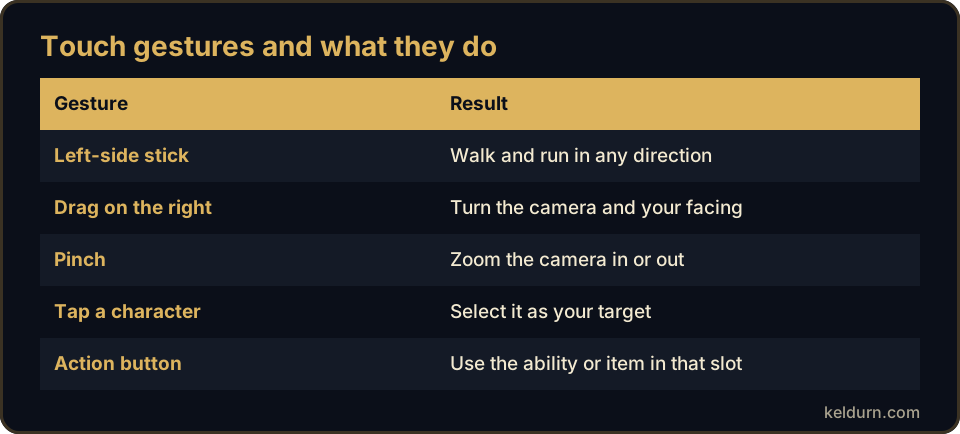
On a phone or tablet, Keldurn shows a touch layout over the game: a movement stick on the left, camera drag on the right, tap to target and a bar of twelve action buttons. Pinch to zoom the camera. It suits questing, travel and most solo combat; busy raid interfaces are easier on a larger screen.
Key facts
| Movement | Virtual stick on the left side of the screen |
|---|---|
| Camera | Drag with one finger on the right side; pinch to zoom |
| Targeting | Tap an enemy, NPC or player |
| Actions | Twelve on-screen action buttons |
| Game windows | Bags, quest log and map open full-size for direct touch |
| Best for | Questing, travel, gathering and solo combat |
Set up your action bar before the first fight
Drag your most used abilities into the first slots of the touch bar, starting with your main attack and a heal or defensive spell. Buttons you press every few seconds should sit where your right thumb rests.
Keep consumables such as food and bandages on the bar too, so you do not need to open your bags between fights.
Play comfortably for longer sessions
Landscape orientation gives the world and the buttons more room. Lower the screen brightness a little and keep the device charging for long quest chains.
When a window such as the quest log or a vendor opens, the touch layout steps aside so you can tap the window directly, then returns when you close it.
- Use landscape mode for questing and groups.
- Keep the tab in the foreground while you play.
- Switch to a laptop or desktop for dense raid encounters if you have one.
Questions players ask
Can I use a keyboard or mouse with a tablet?
Touch controls are the supported way to play on phones and tablets. For keyboard and mouse play, use a desktop browser or the Windows client with the same account.
Do my characters stay the same between phone and PC?
Yes. Characters live on the realm, so you can log out on a phone and continue on a computer with the same account.
Updated September 29, 2026. Keldurn is an independent project compatible with the 1.12.1 era. It is not affiliated with Blizzard Entertainment.